
本日のおすすめです。
ふわふわ~
テキストをスペースキーで次のテキストに
ノベルゲームみたいなやつができます。
後編です。前編はこちら
前編のおさらい
ひとつめのスクリプトを作りました。
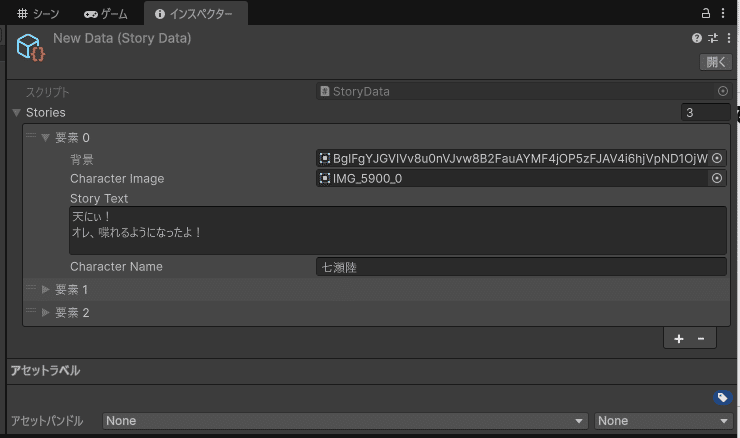
なんかこんなのが作れるようにするためのスクリプトです。
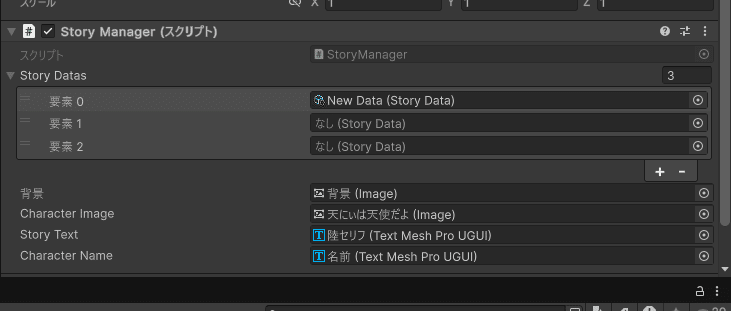
今回はここに使うスクリプトを作るよ!
長いけど頑張ってね。書くのも頑張るね。
用意するものとかは前編を見てね。最初のほうにあるよ。
~ここから本編~
ふたつめのスクリプト
using System.Collections.Generic;
using TMPro;
using UnityEngine;
using UnityEngine.UI;

public class StoryManager : MonoBehaviour
{
    [SerializeField] private StoryData[] storyDatas;
    [SerializeField] private Image background;
    [SerializeField] private Image characterImage;
    [SerializeField] private TextMeshProUGUI storyText;
    [SerializeField] private TextMeshProUGUI characterName;

    public int storyIndex { get; private set; } = 0;
    public int textIndex { get; private set; } = 0;

    private void Start()
    {
        if (storyDatas == null || storyDatas.Length == 0)
        {
            Debug.LogError("storyDatasが空! Inspectorで割り当てて!");
            return;
        }
        Debug.Log($"Starting with storyIndex: {storyIndex}, textIndex: {textIndex}");
        SetStoryElement(storyIndex, textIndex);
    }

    private void Update()
    {
        if (Input.GetMouseButtonDown(0) || Input.GetKeyDown(KeyCode.Space))
        {
            Debug.Log("Input detected: Calling Next()");
            Next();
        }
    }

    public void Next()
    {
        textIndex++;
        Debug.Log($"After increment: storyIndex: {storyIndex}, textIndex: {textIndex}");

        var currentStoryData = storyDatas[storyIndex];

        if (textIndex >= currentStoryData.stories.Count)
        {
            Debug.Log($"TextIndex overflow: Resetting to 0, advancing storyIndex to {storyIndex + 1}");
            textIndex = 0;
            storyIndex++;

            if (storyIndex >= storyDatas.Length)
            {
                Debug.Log("全てのストーリーが終了しました。");
                return;
            }
        }

        SetStoryElement(storyIndex, textIndex);
    }

    private void SetStoryElement(int _storyIndex, int _textIndex)
    {
        if (_storyIndex < 0 || _storyIndex >= storyDatas.Length)
        {
            Debug.LogError($"storyIndex範囲外! Resetting to 0. Current: {_storyIndex}");
            _storyIndex = 0;
        }

        var currentStoryData = storyDatas[_storyIndex];
        Debug.Log($"Current story: Index {_storyIndex}, Stories count: {currentStoryData.stories?.Count ?? 0}");

        if (currentStoryData.stories == null || _textIndex < 0 || _textIndex >= currentStoryData.stories.Count)
        {
            Debug.LogError($"textIndex範囲外かstories空! Resetting to 0. Current textIndex: {_textIndex}");
            _textIndex = 0;
        }

        var storyElement = currentStoryData.stories[_textIndex];

        background.sprite = storyElement.Background;
        characterImage.sprite = storyElement.CharacterImage;
        storyText.text = storyElement.StoryText;
        characterName.text = storyElement.CharacterName;

        Debug.Log($"Displayed: {storyElement.CharacterName} - {storyElement.StoryText}");
    }
}
なんだよこれって思いました?
わかります、なんだよこれ
ひとつずつみていくよ
using TMPro;TextMeshProを使うときに必要みたい。
なんかいい方のテキストが使えるよ
public class StoryManager : MonoBehaviour
いつものです。
そのあとにつけるものをまとめるよ
[SerializeField]後ろにいろいろついてるね
シリアライズ化するためにつけるものだよ
インスペクターからいろいろアクセスできるようになるよ
[SerializeField] private StoryData[] storyDatas; //ストーリーデータのスクリプト
[SerializeField] private Image background; //背景
[SerializeField] private Image characterImage; //キャラの立ち絵
[SerializeField] private TextMeshProUGUI storyText; //ストーリーのテキスト
[SerializeField] private TextMeshProUGUI characterName; //キャラの名前
それぞれアクセスできるようになったよ
プライベートだからそこからだけのアクセスだよ
public int ~ public int storyIndex { get; private set; } = 0;
public int textIndex { get; private set; } = 0;【storyIndex】をだれでも読み取れるようにするよ
【{ get; … }】 これの値を取得できるようになるよ
外から【script.storyIndex】のようにできるよ
【{ … private set; }】設定と変更、ここではプライベートだからここ限定
【=0;】初期値を 0 にするよ
if ( == null) if (storyDatas == null || storyDatas.Length == 0)ストーリーデータがないときに
クラッシュしたり挙動がおかしくならないようにするよ
return; Debug.LogError("storyDatasが空! Inspectorで割り当てて!");
return;ストーリーデータがないときにインスペクターで設定してねってデバッグログをだして、その場で処理を中断して戻るよ
Starting with Debug.Log($"Starting with storyIndex: {storyIndex}, textIndex: {textIndex}");
SetStoryElement(storyIndex, textIndex);デバッグメッセージをこれからどこのテキストを表示するか教えてくれる
止まったときにどのタイミングか教えてくれる
Elementどこの処理をしているのか教えてくれる
if (Input.~)、|| if (Input.GetMouseButtonDown(0) || Input.GetKeyDown(KeyCode.Space))
{
Debug.Log("Input detected: Calling Next()");
Next();左クリックかスペースキーを押されたときを検知するよ
("Input detected: Calling Next()");検知された!次に進むね をしてくれる
Next();次のテキスト、セリフ、シーンに進むよ
++;textIndex++;テキストの値をひとつ増やすよ
今のセリフから次のセリフにいくよ
After incrementDebug.Log($"After increment: storyIndex: {storyIndex}, textIndex: {textIndex}");増やしたあとの値はこれだよを教えてくれる
Currentvar currentStoryData = storyDatas[storyIndex];いま処理しているところ
var currentいま処理してるところだけ取り出して、編集できるようにしてくれるよ
if (>= current~.~Count)if (textIndex >= currentStoryData.stories.Count)今のストーリーのセリフを全部見たかどうかを判定してくれるよ
overflow:Resetting to 0Debug.Log($"TextIndex overflow: Resetting to 0, advancing storyIndex to {storyIndex + 1}");
textIndex = 0;
storyIndex++;今のストーリーのテキストが全部終わったからリセットするよ
advancing to次のストーリーに移動する準備をするよ
if ( Length )if (storyIndex >= storyDatas.Length)全部みたか判定してくれるよ
if (< 0 || >= Length)if (_storyIndex < 0 || _storyIndex >= storyDatas.Length)渡されたものが有効なものかどうかをチェックしてくれるよ
Debug.LogErrorDebug.LogError($"textIndex範囲外かstories空! Resetting to 0. Current textIndex: {_textIndex}");おかしくなったときにエラーを記録してくれる
強制的に最初に戻してくれるよ
if (current == null || < 0 || >= current.Count)if (currentStoryData.stories == null || _textIndex < 0 || _textIndex >= currentStoryData.stories.Count)いま取得したところが使える状態か
指定したところが使える範囲か教えてくれる
DisplayedDebug.Log($"Displayed: {storyElement.CharacterName} - {storyElement.StoryText}");表示の名前を指定できる
ふたつめのおさらい
using System.Collections.Generic;
//C#で型を決めたリストを作る
using TMPro;
//いいテキストのやつを使うよ
using UnityEngine;
//標準C#を使うよ
using UnityEngine.UI;
//標準で基本のC#を使うよ
public class StoryManager : MonoBehaviour
//StoryManagerにある初期スクリプトを使うよ
{
[SerializeField] private StoryData[] storyDatas; //ストーリーデータのスクリプト
[SerializeField] private Image background; //背景
[SerializeField] private Image characterImage; //キャラの立ち絵
[SerializeField] private TextMeshProUGUI storyText; //ストーリーのテキスト
[SerializeField] private TextMeshProUGUI characterName; //キャラの名前
public int storyIndex { get; private set; } = 0;
//storyIndexを誰でも読み取れて設定と変更ができるよ
public int textIndex { get; private set; } = 0;
//textIndexを誰でも読み取れて設定と変更ができるよ
private void Start()
{ //すたーと!
if (storyDatas == null || storyDatas.Length == 0)
{ //ストーリーデータがないときに挙動がおかしくならないようにするよ
 Debug.LogError("storyDatasが空! Inspectorで割り当てて!");
            return;
} //ストーリーデータがないときにインスペクターで設定してねって教えてくれるよ、その場で処理を中断してくれる
 Debug.Log($"Starting with storyIndex: {storyIndex}, textIndex: {textIndex}");
        SetStoryElement(storyIndex, textIndex);
} //デバッグメッセージをこれからどのテキストを表示するか教えてくれるよ、どのタイミングで止まったか教えてくれる
//どこの処理をしているか教えてくれるよ
private void Update()
{ //プライベートの更新!
if (Input.GetMouseButtonDown(0) || Input.GetKeyDown(KeyCode.Space))
{ //左クリックかスペースキーを押されたときを検知するよ
Debug.Log("Input detected: Calling Next()");
//検知された!次に進むね
Next();
} //次のテキスト
}
public void Next()
{ //次!
textIndex++; //今のテキストから次のテキストへ
Debug.Log($"After increment: storyIndex: {storyIndex}, textIndex: {textIndex}");
//次のテキストはこれだよを教えてくれる
var currentStoryData = storyDatas[storyIndex];
//今見てるストーリー全体を便利なとこに詰め込んで、そこだけ取り出して編集できるよ
if (textIndex >= currentStoryData.stories.Count)
//今のストーリーのセリフを全部見たかを判定するよ
{
Debug.Log($"TextIndex overflow: Resetting to 0, advancing storyIndex to {storyIndex + 1}");
            textIndex = 0;
            storyIndex++;
//今のストーリーのテキストが終わったから、次のストーリーに移動する準備をするよ
if (storyIndex >= storyDatas.Length)
//全部見たか判定してくれる
{
Debug.Log("全てのストーリーが終了しました。");
return;
} //終わったら教えてくれる
}
SetStoryElement(storyIndex, textIndex);
} //指定した位置を画面に全部反映されるよ、やっと動いてくれる
private void SetStoryElement(int _storyIndex, int _textIndex)
{ //セリフ変わったりキャラ変わるよ
if (_storyIndex < 0 || _storyIndex >= storyDatas.Length)
{ //渡されたものが有効かチェックしてくれる
Debug.LogError($"storyIndex範囲外! Resetting to 0. Current: {_storyIndex}");
_storyIndex = 0;
} //おかしくなったときにエラーを記録してくれる 強制的に最初に戻してくれる
var currentStoryData = storyDatas[_storyIndex]; //今見ているところ全体を取り出せて、使いやすくしてくれるよ
Debug.Log($"Current story: Index {_storyIndex}, Stories count: {currentStoryData.stories?.Count ?? 0}");
//今処理しているところの状態をデバッグログにだすよ
if (currentStoryData.stories == null || _textIndex < 0 || _textIndex >= currentStoryData.stories.Count)
{ //今取得したセリフが使えるか教えてくれる指定されたテキストが使えるかチェックしてくれる
Debug.LogError($"textIndex範囲外かstories空! Resetting to 0. Current textIndex: {_textIndex}");
_textIndex = 0;
} //テキストのインデックスがおかしいときに、エラーを記録して、最初に戻してくれる
var storyElement = currentStoryData.stories[_textIndex];
//今表示するべきものを取り出して、表示するとこに入れてるよ
background.sprite = storyElement.Background;
characterImage.sprite = storyElement.CharacterImage;
storyText.text = storyElement.StoryText;
characterName.text = storyElement.CharacterName;
//今表示するべきもの全部反映してくれる
Debug.Log($"Displayed: {storyElement.CharacterName} - {storyElement.StoryText}");
} //表示した後、名前とセリフを記録してくれる
}//おしまい!わけわかんないね
だけどおいしいだしまきたまごできたね!
あんまりだしまきたまご食べないけど
いただきます🌟